Deze handleiding is er voorlopig alleen in het Engels.
What is WindCast?
WindCast shows you the wind where you sail. It does three things:
- It shows the wind right now, measured by weather stations around your venue.
- It checks each weather model against reality and decides which model performs best.
- It takes the best model, fixes the error it keeps making, and shows you the forecast for the coming hours.
How to use this guide
Every part of the screen has its own chapter. The pink numbers in the pictures match the numbers in the text. The pictures come from the free venue Medemblik, so the numbers you see on your own screen will be different.
Stay safe. WindCast helps you plan, but it is not a promise. Always look at the water and the sky yourself, and listen to your coach, the race committee and the safety rules.
Getting started
Open windcast.pro on your phone, tablet or pc. Medemblik is free for everyone. Other venues come with a subscription.
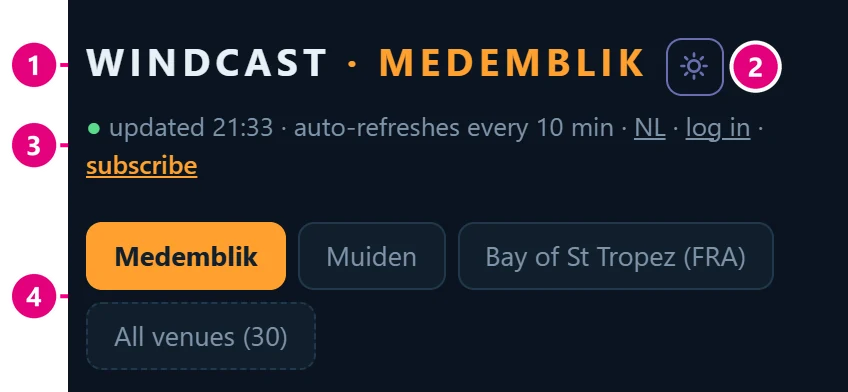
1Venue name. The venue you are looking at.
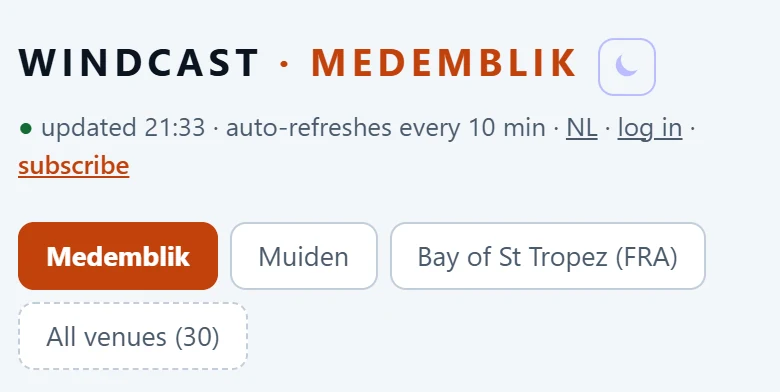
2Sun button. Switches to sunlight mode: a light screen that is easier to read in bright sun. Tap the moon to go back.
3Status line. When the data was last updated. A green dot means fresh data, a grey dot means old data. Here you also find NL/EN for the language, log in and subscribe. Once you are signed in, your name is here instead: tap it for your account and settings.
4Venue tabs. Tap a venue to switch. All venues shows every venue WindCast covers.
Good to know
- The page updates by itself. New measurements come in every 10 minutes.
- Put WindCast on your home screen. It then opens like an app.
- iPhone or iPad: open windcast.pro in Safari, tap Share and then Add to Home Screen.
- Android: open the browser menu and tap Add to Home screen or Install app.
- You need the home screen version on an iPhone if you want alarms (see the chapter Alarms).
Wind, radar & satellite
A map of your venue. See where there is more or less wind, where it turns, and what the stations measure right now.
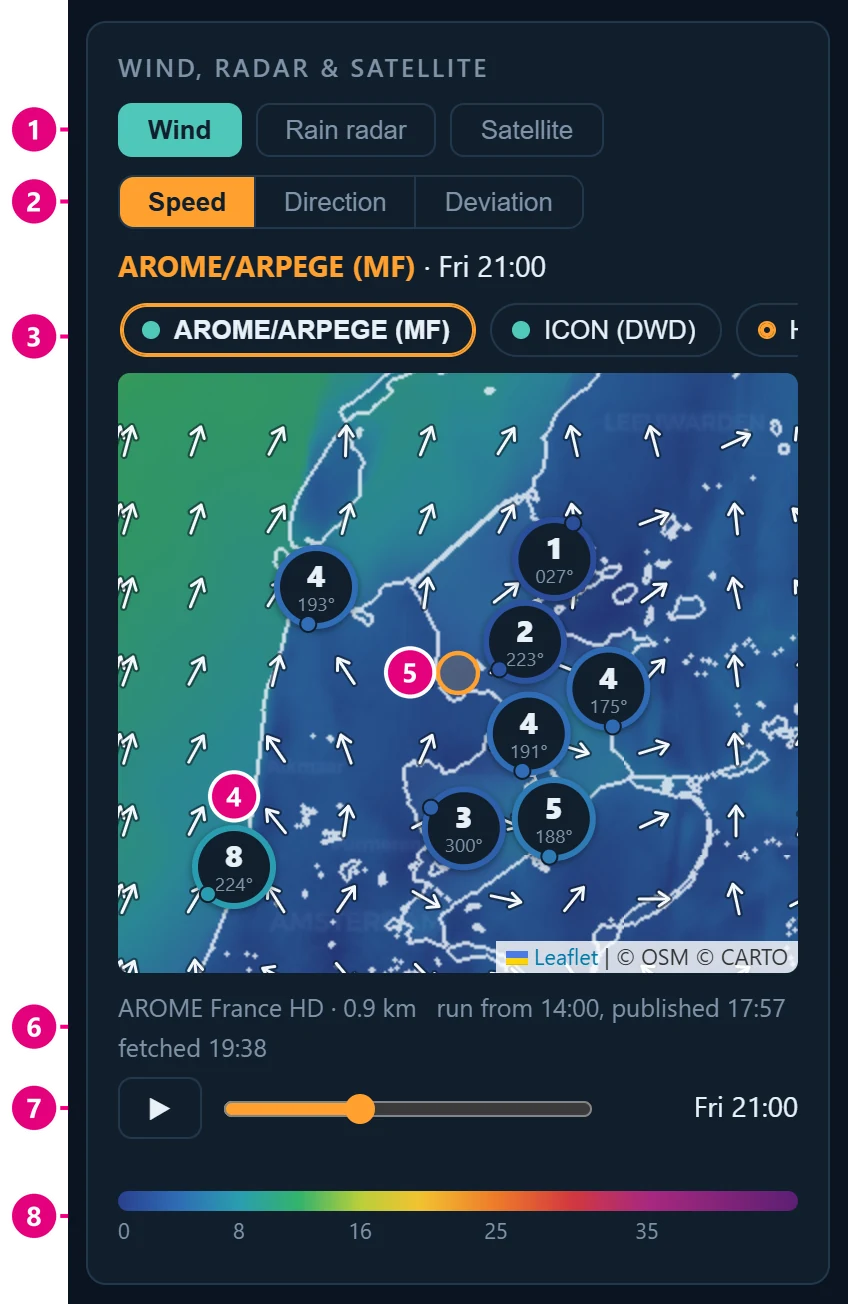
1Wind, Rain radar, Satellite. Choose what the map shows.
2Speed, Direction, Deviation. Three ways to look at the wind. See the pictures below.
3Model buttons. Pick a weather model. Fine models (lots of detail) are on the left, coarse ones on the right. Swipe to see more. The dot: teal = latest run, orange ring = a newer run is out and WindCast is fetching it, red dashed ring = no data.
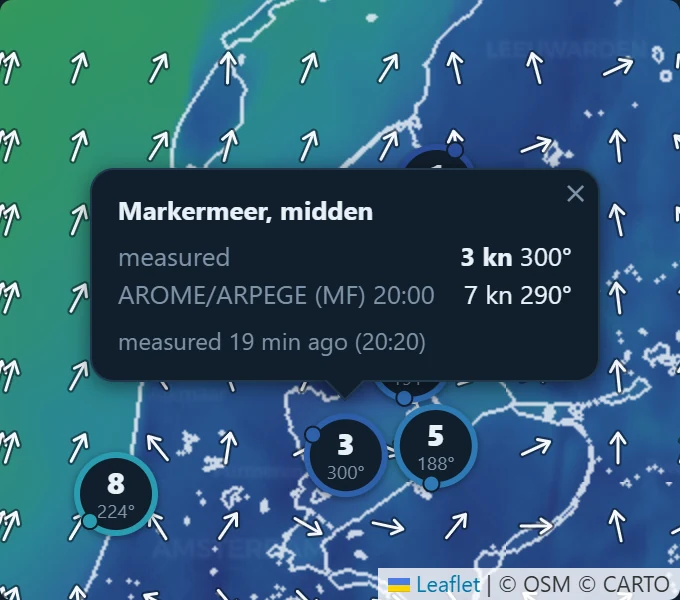
4Station pin. What a station measures now. Big number = knots, small number = direction in degrees. The little dot on the ring sits on the side the wind comes from. A round pin with a number is always a measurement.
5Orange circle: the course. Nothing is measured there. Tap it to see the model forecast for the course.
6Where the map comes from. Model, grid size, when the run started and was published, and when WindCast fetched it. Orange text = WindCast is behind: a newer run is already out, and will come soon.
7Time. Drag the slider to see later hours. The play button shows it as a film.
8Colour scale in knots. Blue = light wind, green and yellow = medium, red and purple = strong. The arrows on the map show where the wind blows to.
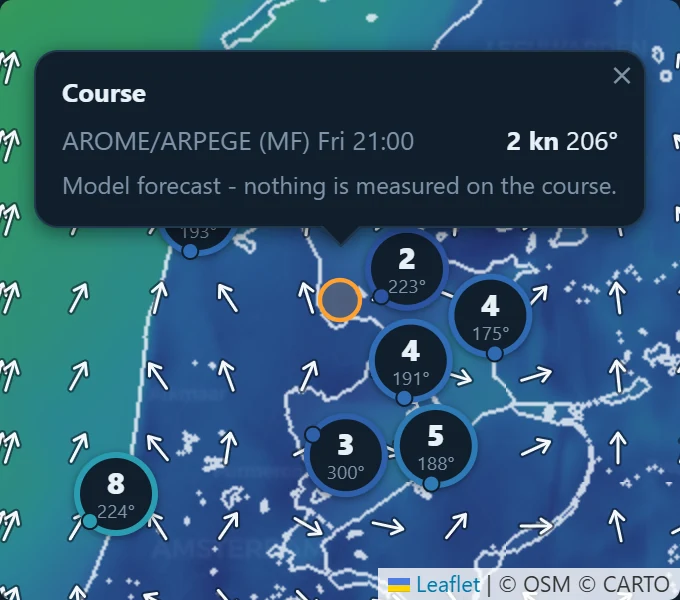
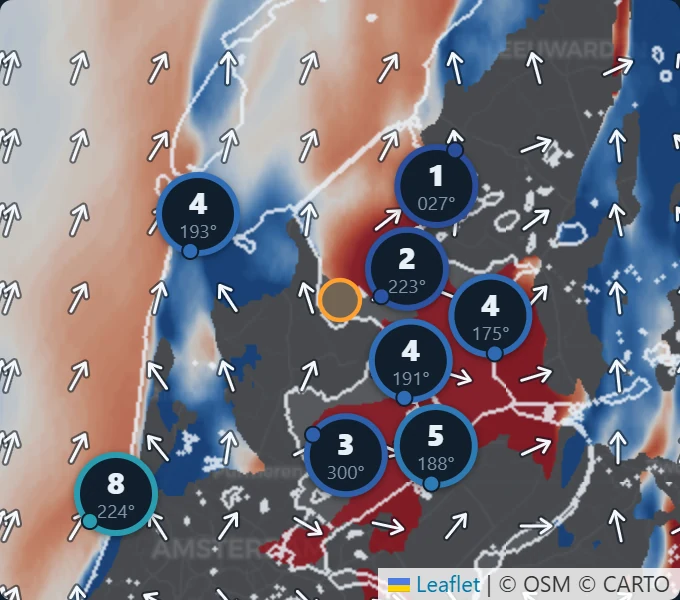

Good to know
- The map opens on the same model as Coming hours. Tap another model button to change it.
- Zoom in on the course and the colours stretch to show small differences. A line then says, for example, “1.7 kn difference across the course, most pressure on the northwest side”. Pressure means more wind. This only works with fine models (under 5 km).
- Coarse models such as ECMWF are drawn in blocks. That is on purpose: they know nothing about details smaller than one block.
- Wind shift coming? When a model shows a sharp line where the wind turns (a front or a sea breeze), the map draws that line and tells you when it reaches the course, and which stations to watch. The ring around a pin then shows if the station already feels it: solid ring = measured, it has turned; dotted ring = the model says it should have turned, but the station does not show it yet; orange ring = it turned earlier than the model said.
- Rain radar plays the latest rain as a short film. Satellite shows the clouds.
Coming hours
The forecast for the next hours. It uses the model that performs best, and takes out the error that model keeps making.
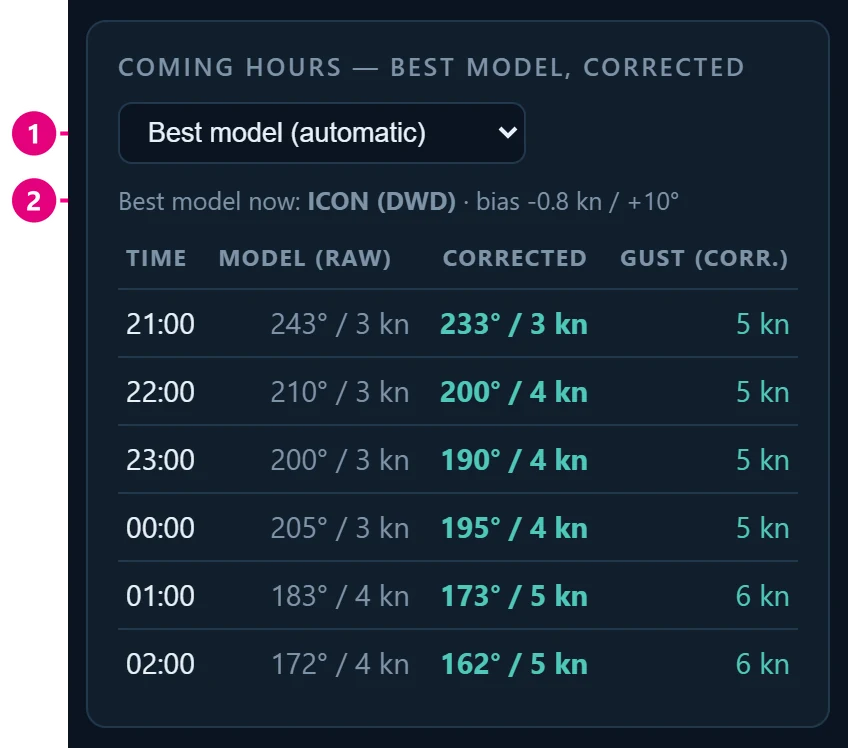
1Model choice. “Best model (automatic)” picks the best model for you. You can also choose another one.
2Which model, and its bias. For example “bias −0.9 kn / +2°”: this model gave 0.9 knots too little wind and had the direction 2° too far clockwise.
The columns
- Time – the hour.
- Model (raw) – what the model says: direction / speed.
- Corrected – the same forecast with the bias taken out. This is the one to use.
- Gust (corr.) – the gusts, corrected in the same way.
How the correction works

A model gave 10 kn, but the stations measured 8 kn. So this model is 2 knots too strong: its bias is +2. When the same model now says 12 kn, WindCast shows 12 − 2 = 10 kn. Direction is corrected the same way, in degrees.
Good to know
- “no bias yet – raw values shown”: there are not enough measurements yet, so you see the raw model.
- “⏱ … runs ~1 h ahead”: this model tends to be early (or late) with changes like a wind shift. The change may come later (or earlier) than the table says.
Model bias now
Which weather model has been closest to the real wind over the last 3 hours, and how far off each model is.
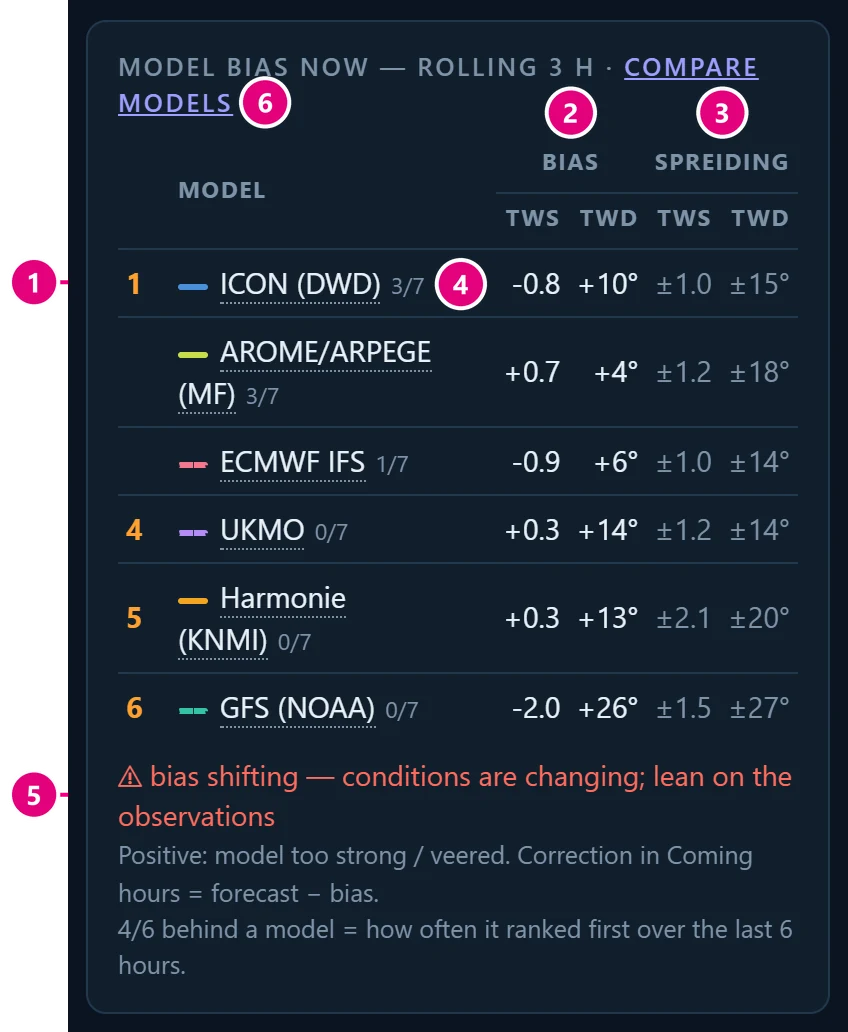
1Ranking. The model at the top was closest to the stations. No number in front of a model means: just as good as the one above it.
2Bias: how far off the model is, on average. Minus = the model gives too little wind, or has the direction too far anti-clockwise (backed). Plus = too much wind, or too far clockwise (veered).
3Spread (the ± numbers): how much the model still misses after the correction. Smaller is better.
4Badge such as 2/7: how often this model was number 1 in the last hours.
5Warning line. “bias shifting”: the weather is changing, so the correction is less reliable. Trust the stations more. “bias stable ✓”: the correction is reliable.
6Compare models opens a page with all models side by side. (This is a hidden gem, and allows to easily see trends and uncertainty in the day)
TWS = wind speed in knots. TWD = wind direction in degrees.
Good to know
- Tap a model name to see how its latest run changed (Run comparison).
- The coloured line in front of a model has the same colour in every chart. Dashed = a global model (coarse, whole world). Solid = a local model with fine detail.
- The ranking looks at the raw error, before correction. So the model at the top is also the best one to open in other apps, which do not correct anything.
- In very light wind (under 3 knots) the direction does not count: there is no clear direction then.
Station tiles
The wind right now: one tile for each weather station.
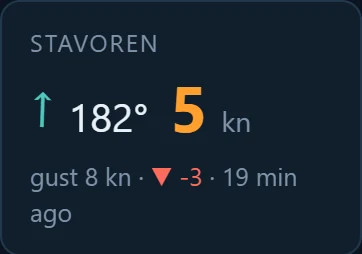
| You see | It means |
|---|---|
| STAVOREN | The name of the station. |
| ↑ (arrow) | Where the wind blows to. |
| 182° | Where the wind comes from, in degrees. See the chapter Words to know. |
| 5 kn | Wind speed in knots. |
| gust 8 kn | The strongest gusts. “gust – kn” means this station does not measure gusts. |
| ▼ −3 | 3 knots less than an hour ago. ▲ = more wind, ▬ = about the same. |
| 19 min ago | How old the measurement is. |
Good to know
- Tap a tile to highlight that station in the chart Wind last 6 hours. Tap it again to show all stations.
- VRB instead of degrees means variable: the wind is too light to have a direction.
- A faded tile means the last measurement is older than 90 minutes. Don’t trust it.
- “waiting for data…” means this station has not sent anything yet.
- A station on a dyke, in a harbour or on land can measure less wind than you get on open water.
Wind last 6 hours
How the wind has changed at each station over the last six hours.
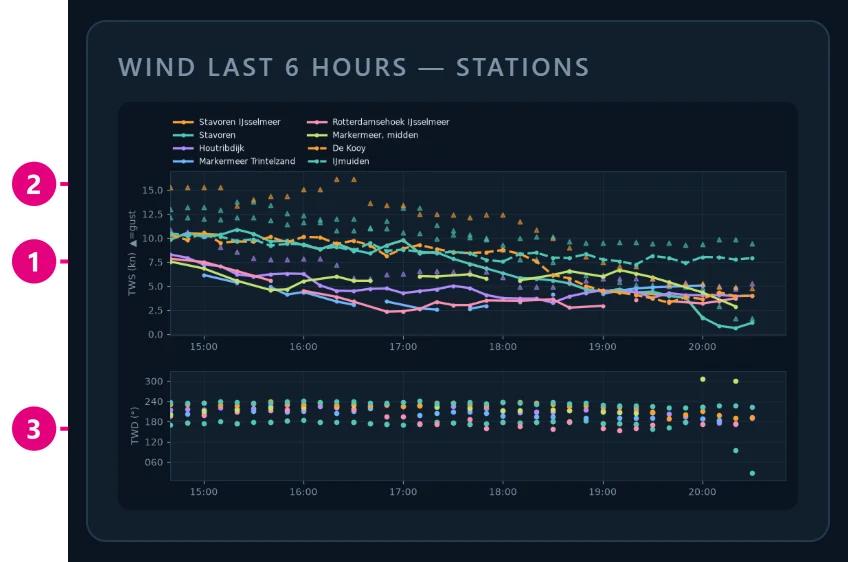
1Lines: wind speed (TWS) per station. Higher = more wind.
2Triangles: gusts.
3Dots: wind direction (TWD). Dots going up = the wind veers (turns clockwise). Going down = it backs.
Highlight one station
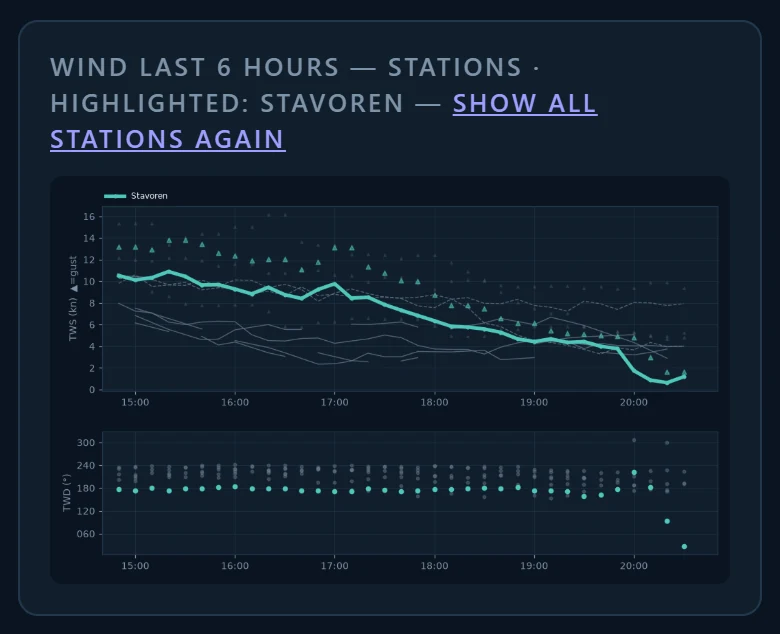
- The names in the chart are small on a phone. Use the station tiles instead.
- Tap a tile: its line becomes thick and easy to follow, the others turn grey.
- Tap the same tile again to show all stations.
- Each station keeps its own colour and line style.
Run monitor
When did each weather model send a new forecast, and did it change its mind?

1NEW: this run came in during the last hour.
The columns
- Model – tap the name to compare its latest run with the runs before.
- Received – when WindCast got the latest run.
- Largest shift (12 h) – the biggest change against the previous run, for the next 12 hours, in knots and degrees.
Good to know
- A weather model is calculated again a few times per day. Each new calculation is called a run.
- Δ (delta) means difference. A big Δ means the model changed its mind: check the forecast again.
Models compared
All models side by side, exactly as they come, without WindCast’s correction. Open it with Compare models in the chapter Model bias now. This is a hidden gem, and allows to easily see trends and uncertainty in the day.

1Buttons. Back to the dashboard, all models, or one model (that opens its Run comparison).
2Wind speed (TWS).
3Gusts, on the same scale as the wind, so you can compare them.
4Wind direction (TWD).
- The dashed line marked now is the current time.
- A darker background means night.
- When the lines stay close together, the models agree and the forecast is more certain. When they spread out, be careful.
What about tomorrow?
The button What about tomorrow? (here, and under the table in Coming hours) opens the same chart for the daylight hours of tomorrow: from one hour before sunrise to one hour after sunset. Between midnight and sunrise it shows today.
- These are the separate models (for example ICON-D2 rather than the ICON mix), raw and without WindCast’s correction.
- The legend shows which run a line comes from, for example ICON-D2 · run 06Z.
- Some models run short forecasts. Then the rest of the day comes from an earlier run of the same model, and the note under the chart says so. A line that stops means that model has nothing further.
Run comparison
Did the latest run of one model change compared with the runs before? Open it by tapping a model name in Model bias now or Run monitor.
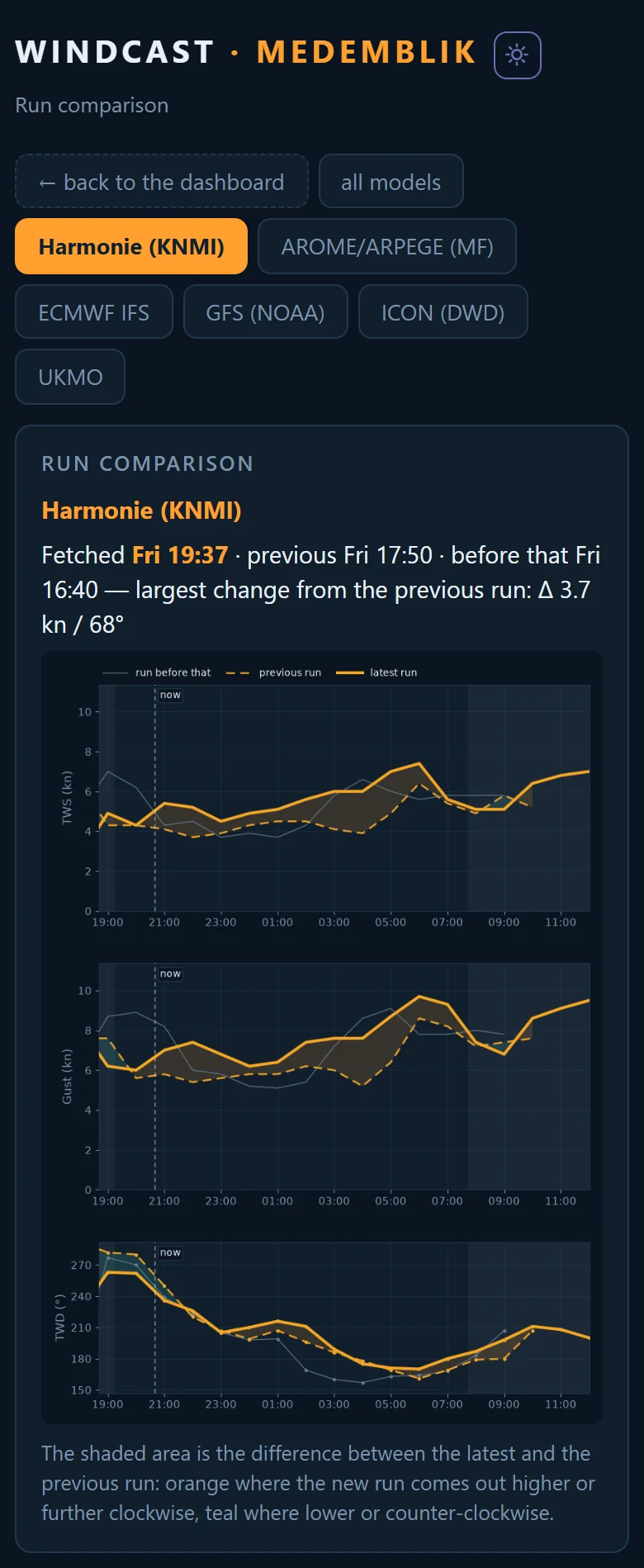
- Thick line = the latest run.
- Dashed line = the previous run.
- Thin grey line = the run before that.
- Shaded area = the difference between the latest and the previous run. Orange: the new run is higher or turned further clockwise. Teal: lower or anti-clockwise.
- At the top: when these runs were fetched, and the largest change.
- Big shaded areas mean the model is not sure. Small ones mean it sticks to its story.
Alarms
Get a message on your phone when the wind does something you care about. You need an account for this. Tap your name at the top of the dashboard, then Alarms.
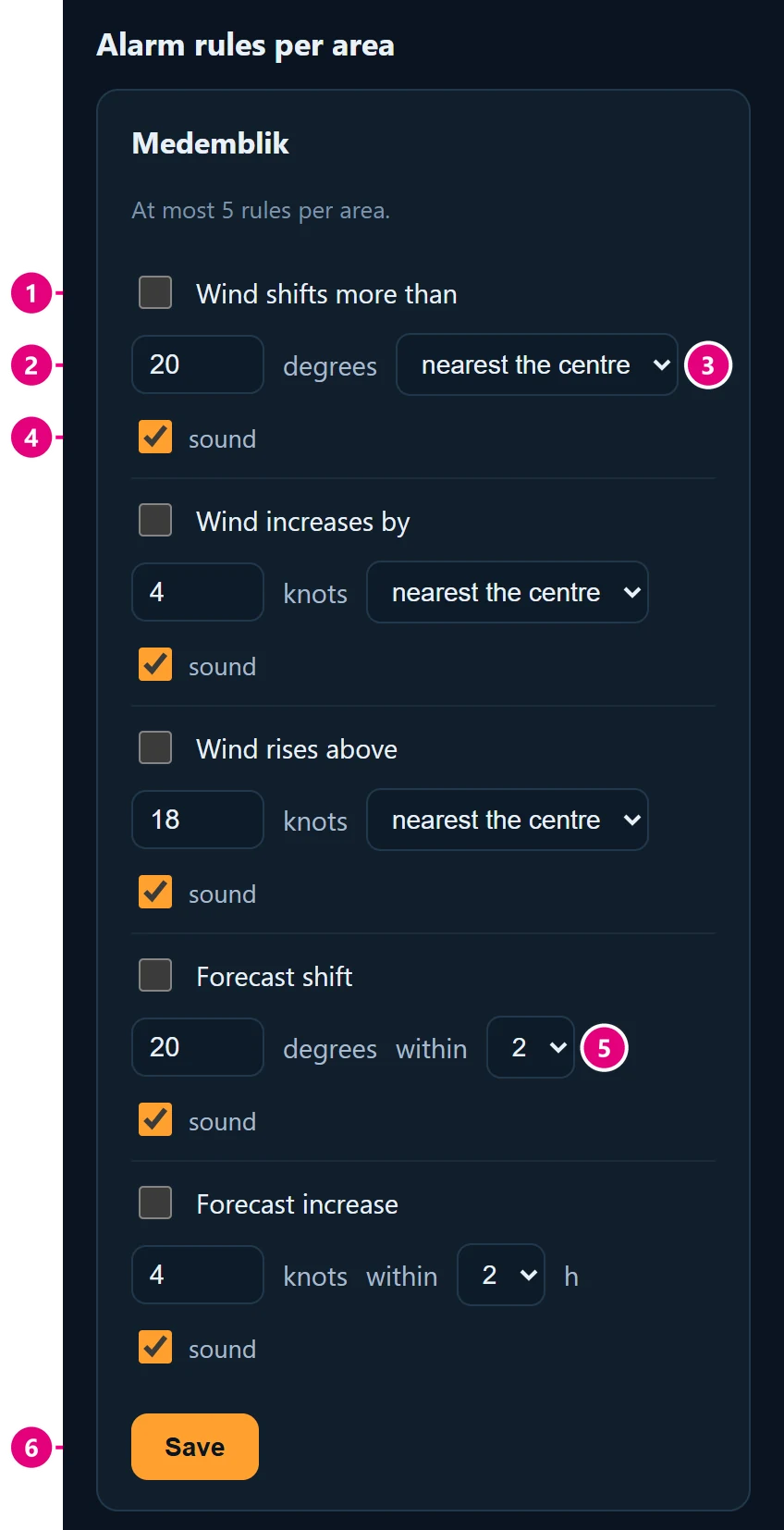
1Tick to switch a rule on.
2Your limit, in degrees or knots.
3Station to watch. “nearest the centre” is chosen for you.
4Sound on or off.
5Within: for forecast rules, how many hours ahead to look.
6Save.
The five rules
- Wind shifts more than … degrees (measured)
- Wind increases by … knots (measured)
- Wind rises above … knots (measured)
- Forecast shift … degrees within … hours
- Forecast increase … knots within … hours
Turn on notifications
- At the top of the Alarms page, tap Enable notifications and allow them.
- iPhone or iPad: first add WindCast to your home screen (see Getting started) and open it from that icon. A normal Safari tab cannot receive notifications.
Good to know
- At most 5 rules per venue.
- Rules are checked every 10 minutes, so a message can come up to 10 minutes late. That is too late for a squall: keep watching the sky.
- Measured rules look at the last half hour as a whole, so one gust does not set them off.
- An alarm goes off once. The same rule waits at least an hour before it goes off again.
- Alarms also show as a bar at the top of the dashboard. Tap dismiss to hide it.
Your account
Signed in? Tap your name at the top of the dashboard.
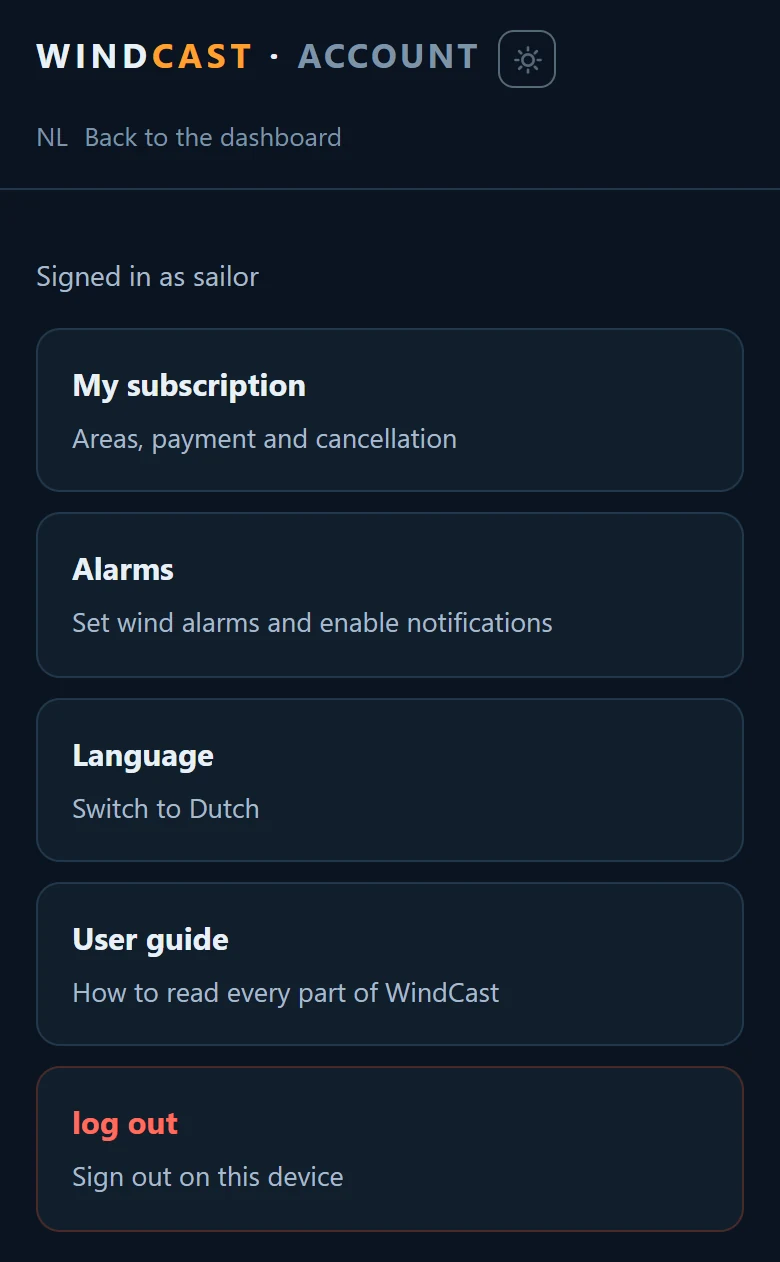
- My subscription – your venues, payment and cancelling. With a subscription you pick three venues, and you can swap venues every month.
- Alarms – set wind alarms and turn on notifications.
- Language – English or Dutch.
- Log out – sign out on this device.
- Not signed in? The NL/EN button is in the status line at the top.
- Medemblik is free for everyone, also without an account.
Words to know
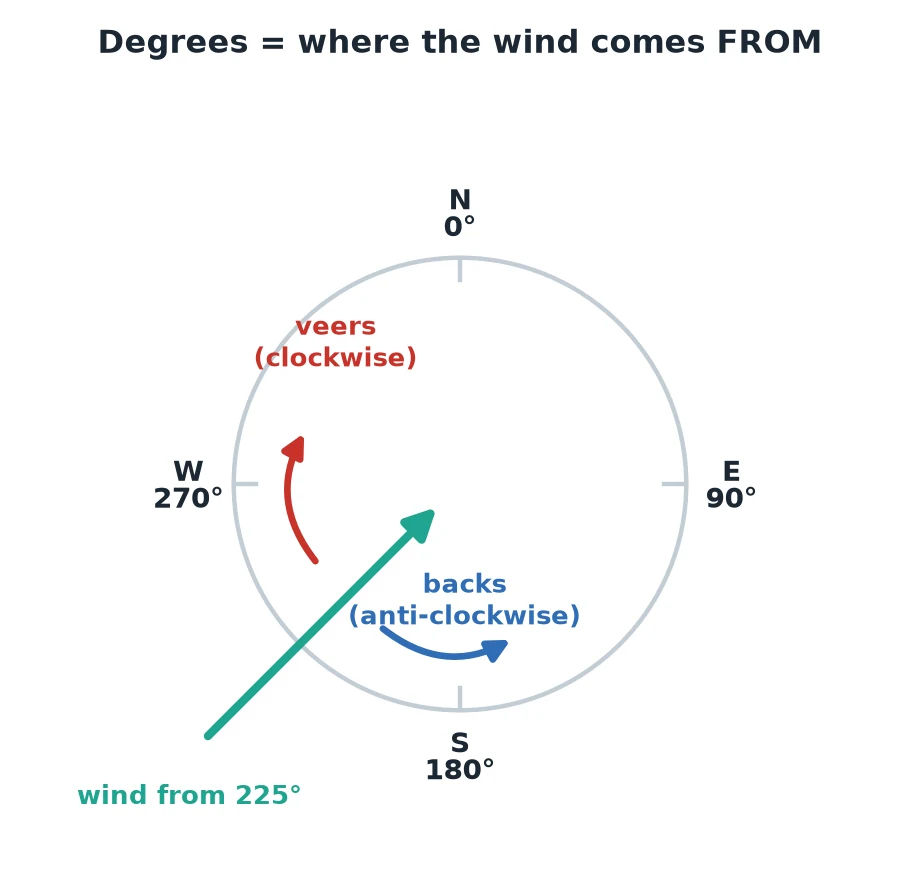
Wind direction is always where the wind comes from. A wind from 225° comes from the south-west.
0° = north, 90° = east, 180° = south, 270° = west.
Veer: the wind turns clockwise, for example from 200° to 230°. On the map that is red.
Back: the wind turns anti-clockwise, for example from 230° to 200°. On the map that is blue.
| Word | Meaning |
|---|---|
| kn (knot) | The unit for wind speed at sea. 1 knot = 1.85 km/h. 10 knots is about 18.5 km/h. |
| TWS | True Wind Speed: how hard the wind blows. |
| TWD | True Wind Direction: where the wind comes from, in degrees. |
| Gust | A short burst of stronger wind. |
| Pressure | Sailing word for more wind. It has nothing to do with air pressure here. |
| Station | A weather station that measures the wind: on land, on a dyke, in a harbour or on a buoy. |
| Weather model | A computer program that calculates the weather. Examples: Harmonie (KNMI), ICON (DWD), AROME (Météo-France), ECMWF, GFS, UKMO. |
| Run | One calculation of a model. Most models make a new run every few hours. |
| Resolution | The size of the squares a model calculates with. 1 km = lots of detail, 25 km = rough. |
| Bias | How far off a model is, on average, over the last 3 hours. |
| Spread | How far off a model still is after WindCast has corrected it. |
| Course | Where you race. On the map it is the orange circle. |